


You’re spending hours every week buried in inbox triage and fighting back-to-back calendar conflicts. The issue isn’t whether you need help. It’s choosing the type of support that improves how your business operates.
Structured delegation can help you reclaim hours and reduce cognitive fatigue. You already know your time is expensive. But the real question is whether the way you spend it matches what you charge clients or generate in revenue.
Figuring out the answer to the question “how much is a virtual assistant?” is a crucial budget decision, not just a hiring choice. Virtual assistants enable you to take back your hours without the costs of adding to your internal team. They can take over administrative work, operations, and specialized functions so you can focus entirely on sales and strategy.
To make this work in your favor, you need to know what VAs cost, how those costs scale, and how to convert them into measurable ROI.

What Affects the Cost of a Virtual Assistant?
Rates can vary based on multiple factors. When you understand what drives the virtual assistant cost, you can match the right assistant to the right workload and avoid over-hiring.
Task Complexity and Responsibility
The complexity of the work and the consequences attached to it are strong indicators of the rate. Low-risk basic admin work is priced much lower because it requires less independent judgment. High-complexity tasks like financial oversight or client management demand a VA who can make decisions without supervision, naturally commanding premium pricing.
Skills and Experience
Experience determines how independently a VA can work. A junior assistant requires clear instructions, while an executive-level VA operates as a strategic partner supporting revenue-impacting initiatives. A VA with extensive knowledge will charge more, which is usually worth it if the role requires that expertise.
Geographic Location
Where your VA is based makes a real difference in the hourly rate for virtual assistant services. VAs in regions with a lower cost of living, like the Philippines or India, offer exceptional value for operational tasks. This difference in pricing isn’t about talent; it’s simply about regional economics.
Where You Hire From
The platform or method you choose also impacts your bottom line. Job marketplaces often charge service fees or commissions that add to the total cost, whereas hiring through personal networks skips these fees. Conversely, VA agencies handle vetting and matching for you, offering a hands-off process.
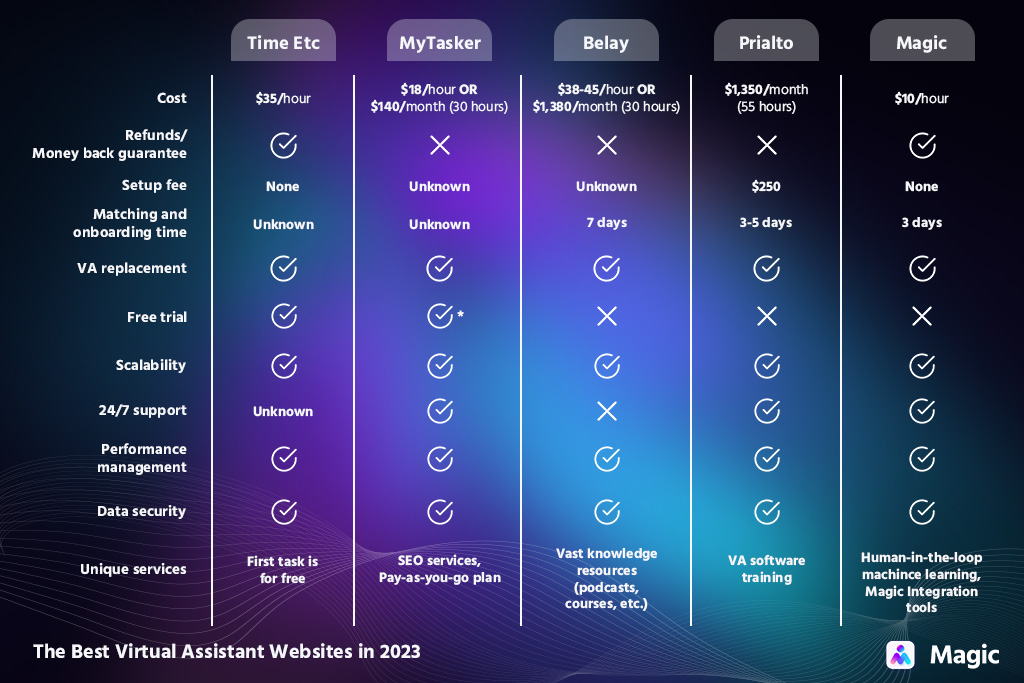
Average Virtual Assistant Hourly Rates
What a virtual assistant costs depends heavily on the tasks you need done. Here is a consolidated view of what businesses typically pay for different categories of virtual assistants, based on current global and U.S. market benchmarks:
| Type of Virtual Assistant | Typical Scope | Global Range | U.S. Range |
|---|---|---|---|
| General/Admin VA | Email, scheduling, data entry, basic ops | $8 to $20/hr | $19 to $27/hr |
| Specialized VA | Bookkeeping, marketing support, CRM, eCom ops | $15 to $40/hr | $25 to $50+/hr |
| Executive Assistant | C-suite support, project coordination, reporting | $25 to $75/hr | $30 to $75+/hr |
These ranges give you a realistic benchmark for budgeting. However, the actual cost depends on the specific deliverables and the level of ownership you expect.
When evaluating virtual assistant pricing, here is what actually drives the rate for each function:
- General Admin Support: The rate for data entry, scheduling, and inbox triage remains highly accessible, at about $8 to $20 per hour globally. This type of work is largely repeatable and easy to train for, but the true value here is volume, as VAs can efficiently clear out the tasks that consume your productivity.
- Customer Service: Costs scale directly with the level of independent judgment required. An assistant handling basic ticket routing falls closer to the global general admin range, while one trusted with resolving complex service escalations moves into the specialized tier from $25 to upwards of $50 per hour.
- Social Media Management: Rates vary based on the strategic ownership involved. Standard posting and scheduling sit comfortably in the $15 to $40 global specialized range. However, when a VA takes over comprehensive content creation or U.S.-targeted strategy, they provide expertise that pushes the rate toward the $50 mark.
- Specialist Work: Functions like technical support, complex bookkeeping, and high-level project coordination require specific tools or professional certifications. You pay a premium for these roles, ranging from $30 up to $75 or more, because they contribute directly to operational stability, automate manual processes, and prevent costly errors.
How Virtual Assistant Hourly Rates Impact Your Business Budget
Hourly rates don’t just dictate what you pay. They shape the structure of your workload, the efficiency of your operations, and ultimately the return you get from every hour of support.
When you understand how cost and capability interact, the decision becomes less about “cheap vs. expensive” and more about “fit vs. friction.” If you’re evaluating the in-house employee vs. virtual assistant cost, those rate differences become even more important.
Let’s look at two realistic scenarios:
Scenario A: The Low-Cost General VA
Imagine the cost of hiring a virtual assistant for general VA work. At $15/hour for 40 hours per week, the numbers look like this: a weekly cost of $600, or an annual spend of $31,200.
On paper, this is a relatively modest investment for full-time support. In your budget, a general VA typically lands in the same cost category as junior admin help. However, the difference is that you’re not paying for employment taxes, benefits, equipment, or office space.
General VAs allow you to stretch your budget further because:
- Broad Coverage: Various small operational tasks can be easily offloaded to a single person.
- Payroll Control: Delegating more hours of work doesn’t have to mean inflating your internal payroll.
- Liability Reduction: A predictable monthly cost replaces the traditional liabilities of in-house hiring.
- Volume Clearance: Dozens of low-value items immediately disappear from your personal workload.
This makes general VAs ideal when your budget is limited but your workload is high. Even with occasional oversight, the value they add often outweighs the virtual assistant cost per hour because they clear volume, and volume is where most business owners lose productivity.
Scenario B: The Higher-Cost Specialist VA
Now imagine hiring a specialist VA at $30/hour for the same full-time commitment. The weekly cost becomes $1,200, bringing the annual spend to $62,400.
This is a meaningful jump, which is nearly double the annual investment, and it shows up clearly in your budget. Specialist VAs take up a larger portion of operating expenses. Because their rate is higher, leaders often assume they’re “more expensive.”
Although specialist VAs might cover fewer tasks, they can transform the efficiency of the functions they do handle:
- Process Automation: Manual workflows that normally eat up hours every week get fully automated.
- Financial Protection: Fewer errors occur, protecting the business from downstream financial impacts.
- System Implementation: Specialized assistants implement new systems that save your team time every single month.
- Cost Avoidance: Keeping this level of work in-house or pushing it to a specialized agency would typically cost two to three times more.
While the upfront cost is higher, the long-term budget impact can be significantly more favorable if the efficiency gains offset part of the cost.
The Fully-Loaded Cost: In-House Employees vs. Virtual Assistants
When you compare virtual assistant rates to traditional salaries, looking at the base pay alone is a mistake. To understand the true financial impact of your hiring decisions, you have to look at the fully-loaded cost of an in-house hire.
Standard internal employees cost significantly more than their hourly wage. Once you factor in payroll taxes, health benefits, paid time off, and equipment, the actual cost of that employee inflates by 20% to 30%.
Here is how those hidden costs stack up against a virtual assistant:
| Cost Category | In-House Employee | Virtual Assistant |
|---|---|---|
| Base Compensation | Fixed salary or hourly wage | Flat hourly rate or monthly retainer |
| Taxes & Benefits | +20–30% (FICA, health, retirement) | $0 (Handled by the VA or their agency) |
| Equipment & Overhead | Laptops, software seats, office space | $0 (VAs provide their own infrastructure) |
| Recruiting & Training | High time and capital investment | Minimal (Especially if pre-vetted by an agency) |
Virtual assistants eliminate administrative overhead. Every dollar you spend goes directly toward completed tasks, transforming a rigid payroll cost into a highly adaptable asset.
Let’s look at the actual numbers. A specialized in-house employee with a $60,000 base salary easily costs the business $75,000 fully loaded. A specialist VA managing that exact same workload at $30 an hour totals $62,400 for the entire year.
The hidden liabilities simply do not exist, leaving thousands of dollars on the table. This recovered capital can be redirected for sales, marketing, and client strategy.
Virtual Assistant Pricing Models
Hourly rates may be the most common way to pay a virtual assistant, but they’re far from the only option. As the VA industry has matured, businesses now have multiple pricing structures to choose from. Understanding these models helps you not only budget more accurately but also structure your support in a way that aligns with your operational rhythms.
The Hourly Rate Model
Under this arrangement, you pay strictly for the actual hours worked. This structure offers a high degree of flexibility because it allows you to bring on help without guaranteeing a set schedule. It is highly accessible, though your final costs will naturally fluctuate based on the volume of tasks you delegate and the VA’s location, skill level, and experience.
| Pros | Cons |
|---|---|
| You only pay for the actual hours worked. | Total monthly costs can be unpredictable. |
| You do not have to commit to a set number of hours each month. | Rates fluctuate widely based on the assistant’s location and experience. |
Best For:
- Businesses where the workload is uneven
- Leaders who are not ready to commit to a fixed monthly schedule
Retainer Packages
These arrangements provide a set number of hours or deliverables each month for a fixed monthly fee. It is a good fit if you need consistent support and want to make sure your VA is available when you need them. Because you are committing to a volume of work upfront, this can come with a discounted effective hourly rate.
| Pros | Cons |
|---|---|
| Expect a more predictable monthly spend. | Hours may expire if not used. |
| Agreements can come with a discounted effective hourly rate. | The scope must be well-defined to avoid limitations. |
| Ensure your VA consistently prioritizes your account. | This offers less flexibility than pure hourly arrangements. |
Best For:
- Teams with stable workflows and recurring weekly tasks
- Businesses that need consistent coverage
Project-Based Pricing
Instead of paying for time, you pay a flat fee for defined outcomes. This could include a CRM build, a reporting dashboard, a marketing automation setup, or a bookkeeping cleanup. You and the VA agree on a price upfront, and the cost doesn’t change based on how long the work actually takes to complete.
| Pros | Cons |
|---|---|
| The total cost is known upfront. | Agreements require clear definitions and expectations. |
| Rates are based on deliverables, not time spent. | Changes or added tasks trigger scope revisions. |
| You can compare providers based on scope. | Rates aren’t practical for ongoing operational work. |
Best For:
- One-time projects or process improvements
- System setups with a clear beginning and end
- Specialized work with defined parameters
Subscription or Managed-Service Models
Some staffing providers package virtual assistance into a subscription model, where you pay a monthly fee for access to a managed VA. You get a set level of support without tracking hours yourself, which is exactly how Magic’s pricing works. These packages often include supervisor support, backup resources, and service-level guarantees to ensure operations never stall.
| Pros | Cons |
|---|---|
| Expect high reliability and built-in redundancy | This has a higher base cost than independent freelancers. |
| The provider offers proactive management. | You might have less freedom to select or change assistants directly. |
| You don’t have to handle HR, hiring, or training. | Some packages cap tasks or communication channels. |
Best For:
- Businesses wanting “plug-and-play” support
- Leaders who want to avoid HR or management responsibility
- Teams that need to easily scale up or down
How to Evaluate Virtual Assistant Pricing Before You Commit
A few things are worth doing before you sign anything or pay a deposit. If you are actively searching and want a deeper dive into the end-to-end process, our hiring guide for entrepreneurs is an excellent resource.
To properly vet an assistant and protect your budget, follow this sequence:
Step 1: Read Reviews from Past Clients
Check what previous clients say about their experience. You want to know not just whether the work was good, but whether the VA showed up reliably and communicated well.
But don’t just glance at star ratings. Look for specific feedback on how they handle tight deadlines, process feedback, or manage unexpected bottlenecks. Past behavior is the strongest indicator of future performance.
Step 2: Watch for Hidden Fees
Some arrangements have extra charges that don’t show up in the headline rate. Ask explicitly about software costs, onboarding fees, or anything else that might be billed separately. The advertised hourly rate means nothing if the administrative overhead blows up your budget.
Step 3: Negotiate the Rates
It’s normal to negotiate virtual assistant services rates, especially for longer-term work or higher-volume projects. Be upfront about your budget. Most VAs and agencies are open to negotiations and find solutions that fit your range.
If a provider cannot move on their hourly rate, try negotiating the terms instead. Sometimes waiving an onboarding fee or securing faster turnaround times yields a significantly better return on your investment.
Step 4: Ask About Trial Periods
A short trial lets you see if the working relationship is a good fit before you commit to anything longer. It’s also worth asking about cancellation policies, so you know what happens if things don’t work out. Never lock yourself into a multi-month contract without testing the waters first.
Step 5: Establish Onboarding Workflows
Once the pricing and trial terms are locked in, focus on integration. Explain how to prepare tools, share credentials safely, and establish communication workflows to ensure immediate productivity.
Tip: Use a password manager to grant access to company platforms. This keeps your operational data entirely secure and makes offboarding seamless if the trial does not pan out.
Maximize Your Virtual Assistant ROI With the Right Support
Getting the most out of virtual assistant services isn’t about choosing the lowest hourly rate. It is about aligning the proper support with the right tasks so every delegated hour turns into meaningful progress. Use our ROI calculator to see exactly what outsourcing could save you.
If you want access to pre-vetted talent without spending time on sourcing, Magic matches you with the right VA within 72 hours. Our assistants are college-educated, backed by AI to work faster, and trained to deliver broad operational coverage. You can check out the different virtual assistant pricing plans to find an arrangement that fits, and easily scale up or down without a contract.
It is time to reclaim your schedule and streamline your operations. Bring the right support into your business today.