
The Research Tool helps you quickly find information online by searching across multiple websites and sources simultaneously. When you submit a query, MagicGPT gathers relevant data from these sources and presents it in a concise, usable format.
How to Use the Research Tool
- Type your query or topic into MagicGPT.
- MagicGPT will search online across multiple websites and sources to gather relevant information.
- Review the results and use them for your client tasks or reporting needs.
This allows you to save time and avoid switching between multiple tabs when collecting data.
Example Workflow
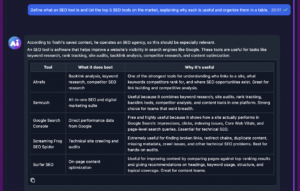
Scenario: Your client wants to research SEO tools, but you are unfamiliar with the topic.
- Prompt MagicGPT with the topic: “Research SEO tools and summarize key features.”
- MagicGPT gathers the information and presents it in a clear, structured way, making it easy to deliver actionable insights to your client.
Formatting the Results
You can control how MagicGPT presents the information based on your needs:
- Table: Add *put in a table* in your prompt.
- List: Add *I need this in a list* in your prompt.
- Spreadsheet: Use keywords like *spreadsheet*, *sheet*, or *Google Sheet* in your prompt.
This flexibility ensures the output is ready to use in reports, presentations, or client updates without extra formatting.